Version 2.76
Version 2.76 | June 7, 2025
Daily Morning Reminder Emails are moved from 10am to 6am and Admin Emails from 10.05am to 7.05am
during login the maker / admin can select first screen as upcoming instead of dashboard (as dashboard takes time to load)
Version 2.75.1 | September 11, 2023
Viewer can also get overdue and upcoming mail reminder if you enable in settings
Version 2.75 | September 5, 2023
In Monthly Compliance Calendar - if there was a delay in completion, the date will come in red color
you can download ics file from upcoming compliance screen to add the compliances to your calendar (outlook / google / etc..)
Version 2.74 | July 23, 2022
One Time Tasks can be created by Makers / Checkers
Audit Compliance : New option to select a month
Compliance Approved On date is now being shown in Audit Compliance and Work Done Report
Version 2.73 | May 4, 2022
New Option : Park for Future
Overdue compliances can be parked for Future. Such compliances will appear in a separate sub menu and will be not considered for sending reminder emails. Activate this option via Settings
Version 2.72 | Jan 19, 2022
Assign Compliances to Entities : From the middle of the year
Currently compliances are assigned for the complete compliance period. Now use can enter a mid year start date for assigning the compliances
Version 2.71 | Nov 15, 2021
Pivot details to have additional planned date column
Email to client for compliance completion will also go to the maker
Version 2.70 | May 28, 2021
New Feature : View Pre-defined Compliances->Assign
It is possible to now assign a pre-define compliance to multiple entities and one maker/checker in a single step
Version 2.69 | Apr 29, 2021
New Feature : Master->Entity : Upload Important Documents
For an entity, important documents like PAN, GSTIN, Memorandum of Association etc can be uploade
Version 2.68 | Mar 27, 2021
1.Carry Forward All entities : Option to carry forward all entities at one go has been added.
2. Based on user feedback in Entity master ,except name remaining fields have been made optional
Version 2.67 | Jan 27, 2021
New Features
1. Monitor Compliance->DashBoard : Entity wise dashboard is now available
2. Monitor Compliance-> Monthly Compliance Calendar: A new sub menu which allows tabular display of monthly compliances of upto 5 entities.
Version 2.66 | Dec 24, 2020
Planning Compliances
A new feature of planning has been introduced. For each compliance , you may updated a "Planned Date" : a target date by which you want to complete the compliance. Planned date is independent of due date and will help you in organising multiple compliances falling due on / around same due date.
Update Compliances -> Upcoming
A new action has been added "Planned Date" . On Clicking , you can enter Planned Date of completion.
In table , Planned Date column has been added, which is sortable
Version 2.65 | Oct 13, 2020
Improving ease of use
1. Import of Entity and Compliances : Sample file has field wise description
2. Create Compliance : Screen layout made better. For faster data entry previously entered values of Type, Proof Mandatory, Regulator and Criticality is repeated
3. Create Compliance and Assign : After creating a compliance, it can be assigned to entities, maker and checker at the same time
4. Audit Compliance : Option to view data ComplianceYear / Financial Year Wise
Version 2.64 | Oct 01, 2020
Major security enhancements in this release
- Google invisible reCaptcha V2 implemented for login and create account
- For change password, previous password is to be given
- Forgot password link will expire in 2 hours
- All form validations being performed on server side also
- All user inputs are encoded and shown in URL
Version 2.63 | Aug 14, 2020
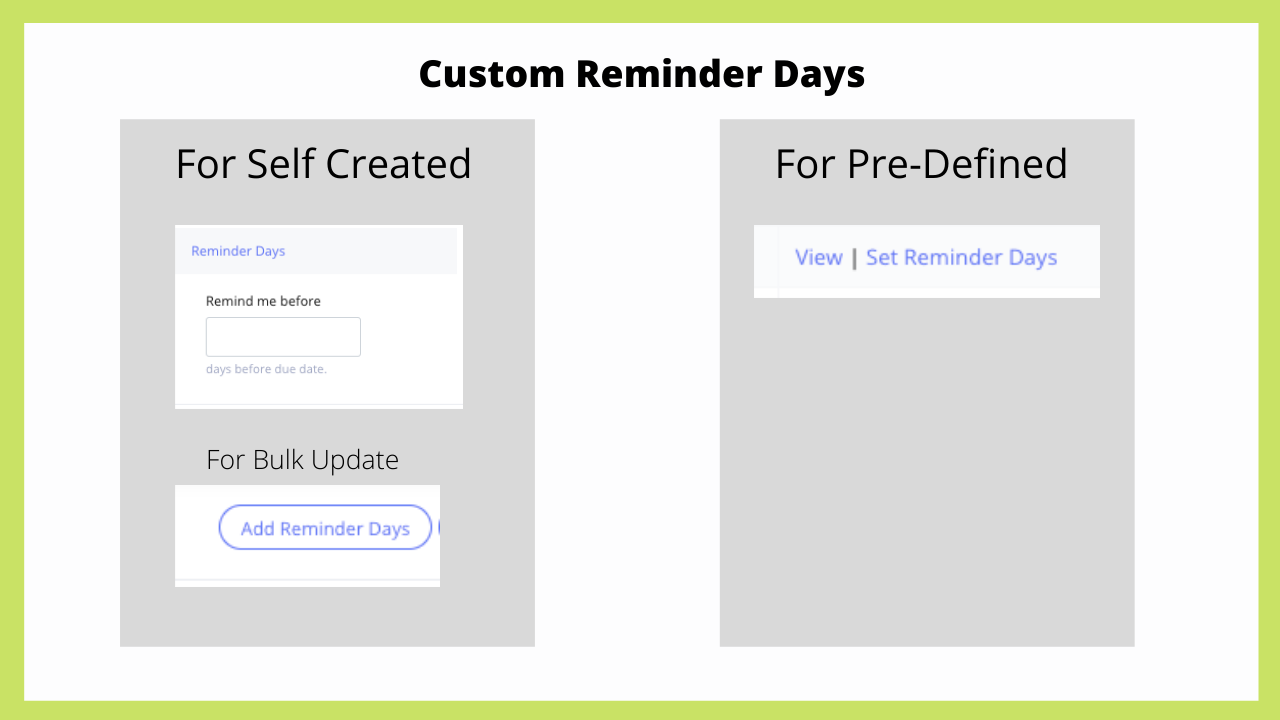
New : Compliance Wise Custom Reminder Days
Steps
1. Settings : Set "Compliance Wise Reminder Days" to Yes
2. Setting Reminder Days :
- For Pre-defined compliances : Add Compliance -> View Predefined : A new action is added
- For self created compliances ; Add compliances - > Edit : A new button added at the top for bulk update of Reminder Days. For individual compliance, this can be done via action button -> Edit Compliance
Other Points
- When Checker logs in , Upcoming and Overdue compliances will display compliances where logged in user is either Maker or Checker
- Two Factor Authentication : This feature is available on request
- Update Compliance : loading time speed is substantially improved
Version 2.62 | July 23, 2020
New : Weekly and Fortnightly Compliances
New compliance frequency introduced. For weekly , the day of week will be asked
New : To-Do
Each user can maintain simple to-do list within Proactly, visible only to the user , not even to the Admin
New : Remember me
While logging in , if Remember Me is ticked, there will be no need to enter login credentials for next 24 hours
Other minor enhancements, bug fixes and improvements
- While assigning compliances to a Checker, the name of Maker will be visible
- Account Admin will be able to edit Account Information
- Minor enhancements in Pivot
Version 2.61 | June 27, 0202
New Feature : Pivot
In Analytics : a new sub menu is added called Pivot
Just like MS Excel Pivot , you can now analyse your data across compliances, entities and users . You will summary as well details of selected criteria.
Other minor changes
- Update Compliances->Defective Compliances : User dropdown will work
- DashBoard->Upcoming Compliances for next 7 day. Drill down was not working in few cases . Now fixed
Version 2.60
User : Deactivate
When a user leaves organisation , deactivate option can be used. Such user will not be able to login. However all compliances completed by or approved by such users will remain intact. Before deactivating user , make sure that either there are no pending compliances or such compliances are transferred to another user. Deactivating a user will increase the number of invitation count.
User : Invite
While inviting user, role is being asked. This will help you save on one more step of assigning role to a maker.
User : Change Role
While assigning role involving change of role , these rules have been implemented
- A checker can be only be changed to an Admin
- A maker can be changed to checker or Admin
- However if no compliances have been assigned to a user, then such restrictions will not apply
Pending Approvals : Checker View
A checker can also be assigned role as a maker. This makes a checker in peculiar situation. So in Upcoming Compliances there will be two sub menus
- Pending Approvals : This will show compliances completed by other makers which are to be approved by the logged-in checker
- Pending Approval- Maker : This will show compliances completed by logged-in user , where there is another checker
Other minor changes
- mandatory text fields marked with * in all forms
- "Not Required" column added in tables in Update Compliances and Monitor Compliance
- Pending Approval : Action "Approve" will come only when a checker has logged in
Version 2.59
Import from Excel feature has been added for the following
- Entities
- Compliances
Version 2.58
Analytics
New menu added. one report added. More to follow
Work Completed by Makers : This report shows compliances completion updated in Proactly by makers. So while actual date of completion can be on due date, maker may update it in Proactly after 2-3 days. This report timeliness or delay in updating compliance completion in Proactly
Version 2.57
Carry Forward Compliances
Assign Compliances -> Carry Forward Compliances
- You can carry forward all compliances alongwith entity and users from one Compliance Period to next Compliance Period. One Time compliances and tasks will not be carried forward. Similarly deactivated entities and compliances will be not carried forward
Date Extension
- Delete option is provided under update Compliance->Date Extension. This option can be used by Admin to reverse any date extension done erroneously
- Add Compliance->Edit-Date Extension screen has been improved and made more user friendly
Bug Fixes
- Assign Compliances->Edit Assigned: Name of Checker, Viewer, Auditor was coming as NA.
- Update Compliances- >Defective Compliances : Records of all makers were visible. Now records only pertaining to logged in maker / checker will be visible
- Assign Compliances->Transfer : Several validations introduced. If there are pending approvals or defective compliances, user transfer will not be allowed.
Version 2.56
Monitor Compliance->Audit Compliance
Download with Proofs : Admin can now download details of all completed compliance along with proofs.
Monitor Compliance->Dashboard->Compliance Breakup Summary
When user wise break-up is selected, a new Chart link appears. Clicking this link will open user wise compliance completion chart
Bug Fixes and minor enhancements
- "No User Assigned" changed to "No Maker Assigned".
- "Defective Compliances" to be visible to Checker
- "Update Compliances" count of compliances bug fixed
Version 2.55
Bug Fixes and minor enhancements
- Account information can now be updated only by Administrator, others can only view it.
- Upcoming Compliance and Overdue Compliances tabular view will show one additional column "Type" : Govt/Internal
- Edit Assigned : Tabular view will show two additional columns : Viewer / Auditor
- Entity : List of States updated to include Ladakh. New Delhi corrected as Delhi
Version 2.54
Maker cannot be a checker
A checker can also work as maker , but a maker cannot be a checker. Consequentially wherever a checker is selected, only users who have been assigned "checker" role will appear in the dropdown in the following screens
Assign Compliances - > Assign to User
Assign Compliances - > Edit Assigned
Assign Compliances - > Transfer
Add Compliances->Create->One Time Task
Remove Checker from individual compliance
Currently a checker once assigned to an individual compliance, cannot be removed. Now this option is provided.
Assign Compliances - > Edit Assigned : When a checker is selected , the dropdown will show value "None". Once "None" is selected, the checker will be removed from the compliance
Bug fixes
Reason for delay will be asked only if completion date > Due Date
While adding a user, if the count left is zero , it was not allowing to add a "Viewer/Auditor" ( for which there is no limit). This is fixed now
Version 2.53
Compliance Start Date
While creating compliance , Compliance Start Date can be entered
- It can be left blank, in which case compliances will be created for the complete compliance period
- If this date is given , then only compliances failling due after this date will be created
Example
| Compliance | Frequency | Compliance Start Date | Count for 2019-20 |
| GSTR-3B | Monthly | Blank | 12 |
| GST ANX-1 | Monthly | 01-10-2019 | 6 |
Version 2.52
Notifications
Notification icon shows unread notifications. This will show
- all date extension notifications
- creation of one time tasks
Gradually more notifications will be added
Table Scrolling
in all the screens , display made better by allowing full information to be shown in one line with scrolling. Column containing Action will remain stati
Version 2.51
Compliances where No User Assigned
When compliances are assigned to entities but not assigned to any user, they do not appear in Upcoming or Overdue menus
Now such compliances will appear in a separate tab "No User Assigned" . No action will be possible. This will work as a reminder to Admin to take action and assign makers and checkers
Menu Revamp
Two menus have been revamped to make them more logical and easy to navigate
Add Compliance
Assign Compliance